If your school has adopted a new school management system this article takes you through the process of syncing with that new system.
WARNING: This process involves removing the existing parent, student and teacher data from your system - before doing this you MUST wait until any currently live evening or event is completed.
Preparation
You will be deleting your current data so you should first back up anything you wish to keep a record of (such as bookings on evenings in the past). You can get backups of your data in the following ways:
| Data | Instructions |
| Appointments | Parents' Evenings > Go to Evening > Manage Appointments > Export All Bookings |
| Bookings | Events > Go to Event > Manage Bookings > Export All Bookings |
| Reports | Parents' Evenings > Go to Evening > Reports, once there Select the report you wish to export Export |
| Parents and Students | Data > Parents > Export Parents |
Students | Data > Students > Export Students |
Deleting your existing data
WARNING: before doing this you MUST wait until any currently live evening or event is completed.
To delete data, you firstly need to enable an option to allow manual edits to your data. In your navigation panel on the left of screen, go to the Settings > Data Import Source page and make sure the Allow data to be manually imported option is enabled. If you currently import your data through CSV files, you already have this enabled.
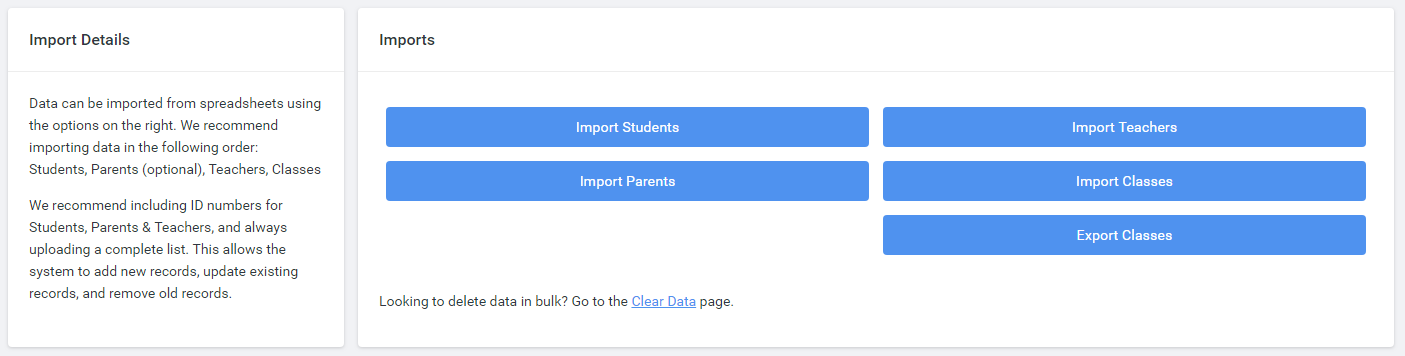
Once this is done, go into the Data section on the navigation bar on the left and click the Clear Data option under the blue Imports buttons.
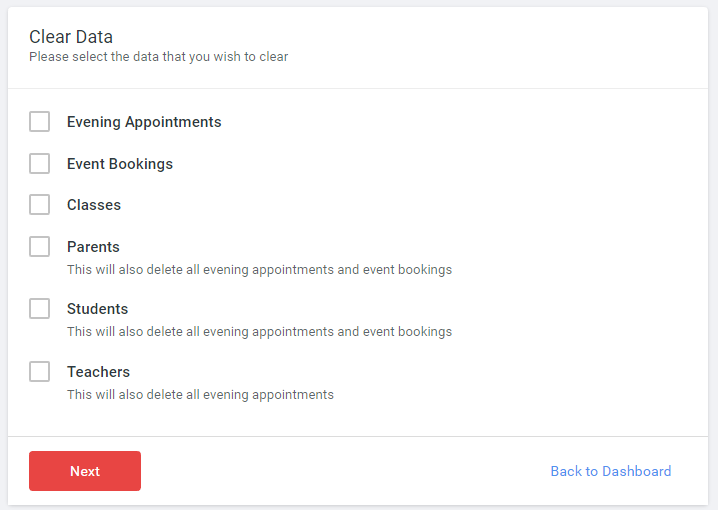
Select each of the boxes on the Clear Data dialog then click the red Next button.
If you have an evening or event in the future with appointments or bookings, the system will warn you that continuing will delete those appointments. Unless you know what these are, and that you do not want to keep them, we don't recommend proceeding if such a warning appears.
Switching to a new Management System
Once you've deleted the data on Tes Parents' Meetings please get in touch with us by emailing us on schoolcloud@tes.com and we'll get you setup. Please tell us that you're looking to change management system and that you've already cleared your data.
While we set you up, you may find it helpful to look at our School Management Systems help articles if you aren't sure where to find something. We have guides for most management systems we support (SIMS specific guides can be found here).
If you run into any problems with any part of the process, please drop us an email at schoolcloud@tes.com or give us a call on 0333 344 3403 and we'll help you as much as we can.
Was this article helpful?
That’s Great!
Thank you for your feedback
Sorry! We couldn't be helpful
Thank you for your feedback
Feedback sent
We appreciate your effort and will try to fix the article