Syncing Pre-Admission Students
The student record in SIMS needs to be set as 'Accepted' (not 'Applied') Pre-Admission to be able to include them in the sync from SIMS.
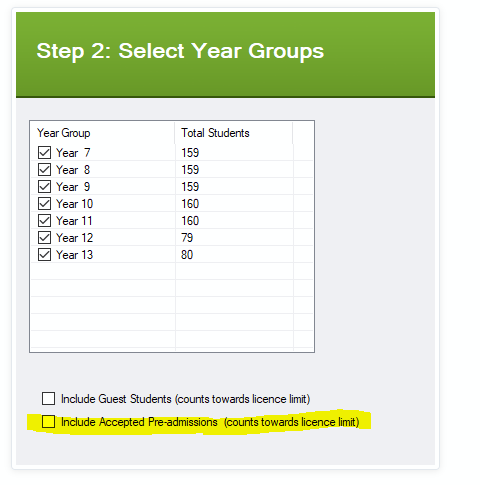
You can include the Accepted Pre-Admissions onto your system by running the Parents Evening System SIMS Extract Tool and when you are on Step 2: Select Year Groups make sure you tick the box next to Include Accepted Pre-Admissions (counts towards licence limit).
Allocating Pre-Admission Students to a Teacher
Once the students are on Tes Parents' Meetings, you will then need to create a Custom Group(s) to allocate the students to a teacher. Please see the guide on Creating Custom Groups which will take you through how to do this.
Was this article helpful?
That’s Great!
Thank you for your feedback
Sorry! We couldn't be helpful
Thank you for your feedback
Feedback sent
We appreciate your effort and will try to fix the article